- Get 50% OFF Your First Consultation – Limited Time Offer!

Quick Summary :- Google Ads conversion tracking helps businesses measure what happens after someone interacts with an advertisement. Instead of evaluating campaigns only through clicks and traffic, conversion tracking can show whether users complete valuable actions such as form submissions, phone calls, bookings or purchases. A reliable setup starts by defining the right business actions, creating conversion actions, installing the required tracking, testing the complete journey and then using accurate conversion data to improve campaign decisions.
Running Google Ads can bring visitors to your website, but clicks and traffic alone don't tell you whether your campaigns are actually generating business.
This is where Google Ads conversion tracking becomes important.
Conversion tracking helps you measure valuable actions taken by users after interacting with your ads. Depending on your business, a conversion could be a form submission, phone call, purchase, booking, or another important action.
In this blog, we will explain what Google Ads conversion tracking is, why it is important, and how to set it up step by step.
Google Ads conversion tracking is a measurement system that helps advertisers understand what happens after someone interacts with their advertisement.
For example:
Google Ad → Website Visit → Contact Form → Lead
Or:
Google Ad → Product Page → Add to Cart → Purchase
Without conversion tracking, you may know that someone clicked your advertisement, but you may not know whether that click resulted in a lead or sale.
Tips: Don't measure Google Ads only by traffic. A campaign becomes much easier to evaluate when you can connect clicks with leads, bookings, calls, purchases or other valuable outcomes.
Conversion tracking helps you understand whether your advertising budget is generating meaningful results.
Measure Leads
You can track actions such as contact form submissions and enquiry requests.
Track Sales
E-commerce businesses can measure purchases and revenue.
Measure Phone Calls
For businesses that receive enquiries by phone, call conversions can be important.
Understand Campaign Performance
You can compare campaigns, ads, keywords, and other elements based on the conversions they generate.
Improve Your Advertising
Conversion data can help you make better decisions about your campaigns and budget.
Tips: Use conversions to evaluate whether advertising is producing actual business value rather than simply generating activity inside the ad account.
The right conversion depends on your business.
Service Business
You might track:
E-commerce Business
You might track:
Lead Generation Website
You might track:
The important thing is to identify the actions that have actual business value.
Tips: Separate primary business outcomes from supporting interactions. A purchase or qualified enquiry usually deserves more importance than a generic button click.
Before opening Google Ads, decide what counts as a conversion for your business.
For example, if you are running Google Ads for a digital marketing agency, your primary conversion could be:
Contact Form Submission
You may also want to track:
Keep your main business objective clear.
Tips: Define the conversion before building the tracking setup. If you don't know which action matters most, it becomes difficult to decide what should be measured and optimized.
Sign in to your Google Ads account and go to the conversion or Goals section.
Create a new conversion action and select the type of action you want to measure.
Depending on your setup, Google provides different ways to track conversions, including website actions, phone calls, app-related actions, and imported conversions.
For a website, you will generally start by choosing a website conversion.
Tips: Create separate conversion actions for genuinely different outcomes so your reports remain easy to understand later.
Choose the action that represents the outcome you want to measure.
For example:
Lead Form Submission
or
Purchase
You can then provide relevant details for the conversion action, such as its name and other settings.
Give your conversions clear names.
For example:
This makes your reports easier to understand later.
Tips: Use conversion names that clearly describe the business action. Avoid vague names such as "Conversion 1" or "Website Action."
If possible, assign an appropriate value to your conversions.
For an e-commerce purchase, the actual transaction value can be useful.
For leads, you can assign a value based on the estimated business value of a qualified lead.
For example, if you know that your average qualified lead is worth approximately ₹5,000 to your business, you may use an appropriate value based on your own business data.
If you don't have reliable data yet, avoid assigning an arbitrary value just to fill the field.
Tips: Conversion values should reflect real business economics wherever possible. Incorrect values can make campaign performance appear stronger or weaker than it actually is.
Google Ads may require a Google tag to be installed on your website for conversion measurement.
The Google tag helps Google collect the information required for measurement.
Depending on your website and technical setup, you may install it:
For many websites, Google Tag Manager (GTM) can make managing tracking tags easier.
Tips: Keep ownership of tracking accounts with the business and document how the tracking is implemented. This makes future maintenance much easier.
After setting up the conversion action, configure the event that should be counted as a conversion.
For example, suppose you have a contact form.
The desired flow could be:
User visits website
↓
User fills out form
↓
User submits form
↓
Conversion is recorded
The exact implementation depends on how your website and form are built.
For an e-commerce website, the conversion may instead happen when a customer successfully completes a purchase.
Tips: Trigger the conversion on the completed business action whenever possible, not simply when someone starts the process.
Don't assume your tracking is working just because the tag has been installed.
Test the complete process.
For example:
Open Website → Submit Form → Check Tracking
For an e-commerce store:
Open Product → Add to Cart → Checkout → Complete Purchase → Check Conversion
Testing helps identify problems before you start relying on the data.
Tips: Always perform a real end-to-end test. A tag appearing on the page does not automatically mean the correct conversion is being recorded.
Once conversions start being recorded, you can analyze them inside Google Ads.
You can review metrics such as:
This gives you a clearer picture of whether your advertising is generating meaningful results.
Tips: Compare cost per conversion with the actual value of the lead or sale. A low conversion cost is useful only when those conversions are valuable to the business.
Imagine Agyle Studio is running a Google Ads campaign for website design services.
The campaign receives:
1,000 clicks
But clicks are not the final goal.
Suppose:
1,000 Clicks
↓
80 Contact Form Submissions
↓
20 Qualified Leads
↓
5 New Clients
Now you can start evaluating the campaign based on actual business results rather than traffic alone.
This is why conversion tracking is so important.
Tips: Go beyond the first conversion whenever your sales process allows it. Knowing which leads become qualified opportunities or customers provides even more useful campaign insight.
Google Ads and Google Analytics can both be used for measurement, but they serve different purposes.
Google Ads Conversion Tracking
Focuses on advertising conversions.
Google Analytics
Provides broader website and app analytics.
They can be used together to create a more complete measurement setup.
Tips: Don't expect Google Ads and Analytics reports to answer exactly the same questions. Use each platform for the type of measurement it is designed to provide.
Tracking Only Clicks
Clicks are useful, but they don't tell you whether visitors became customers.
Not Testing the Tracking
A conversion tag that isn't firing correctly can result in inaccurate reporting.
Counting the Wrong Actions
Not every website interaction should necessarily be treated as a primary conversion.
Duplicate Conversions
Poorly configured tracking can sometimes cause the same action to be counted more than once.
No Clear Conversion Strategy
If you don't know which actions matter to your business, it becomes difficult to decide what you should track.
Ignoring Data Quality
Incorrect implementation can lead to unreliable conversion data and poor campaign decisions.
Tips: Tracking errors can affect both reporting and optimization. Verify your setup whenever forms, checkout flows, website templates or tracking tools are changed.
A simple conversion tracking plan could look like this:
Primary Conversions
These are actions directly connected to your business goal.
Secondary Actions
These can help you understand user behaviour.
Not every interaction needs to be treated as a primary conversion.
Tips: Keep primary conversions focused on the actions you genuinely want campaigns to optimize toward, while using secondary actions for additional behavioural insight.
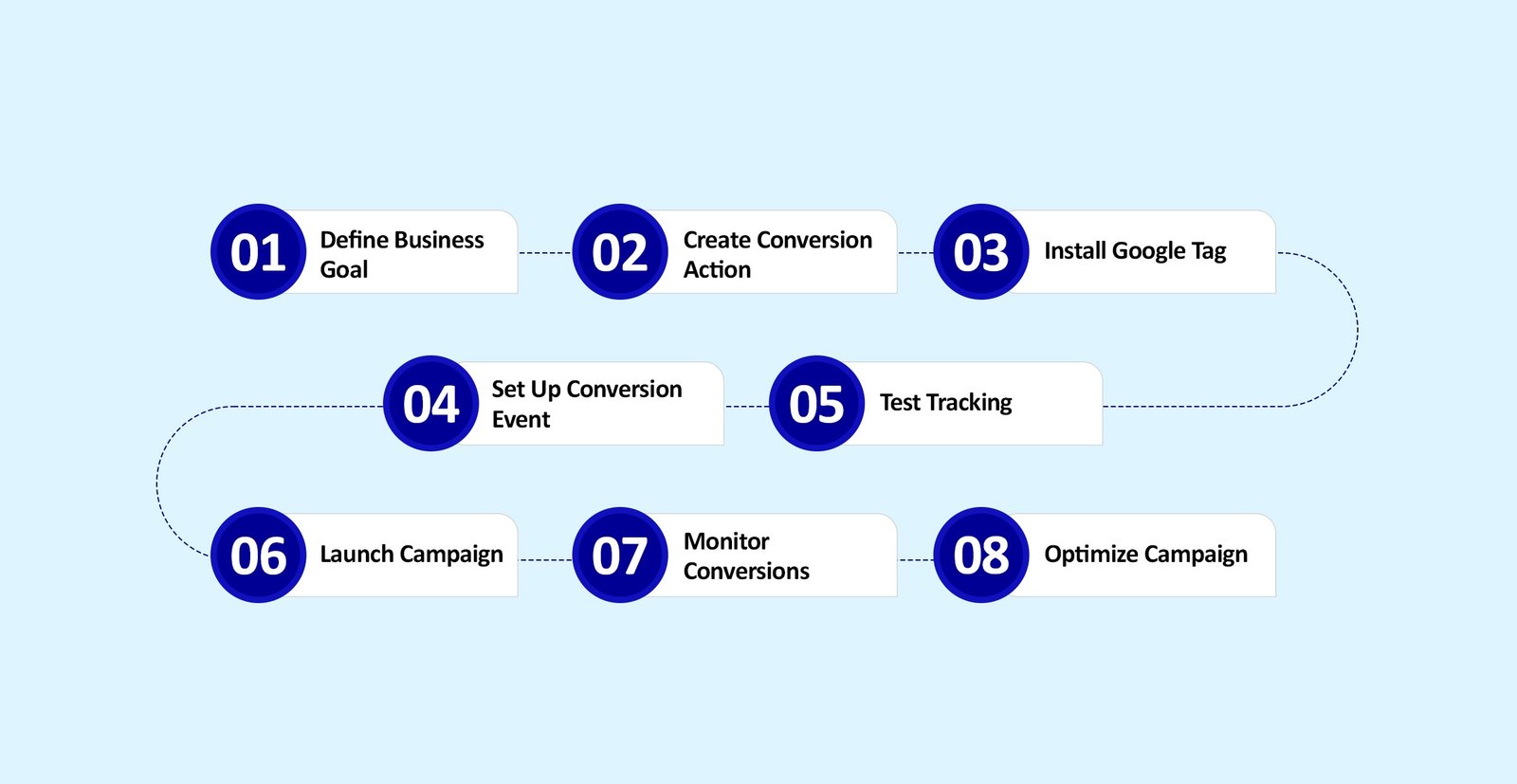
A basic setup can be:
Define Business Goal
↓
Create Conversion Action
↓
Install Google Tag
↓
Set Up Conversion Event
↓
Test Tracking
↓
Launch Campaign
↓
Monitor Conversions
↓
Optimize Campaign
This gives you a structured way to measure the actions that matter.
Tips: Treat measurement as part of campaign setup, not something to add after advertising has already started.
Running Google Ads without conversion tracking is like measuring your marketing only by the number of visitors.
You may know how many people clicked your ads, but you won't have a clear picture of what happened afterward.
With proper Google Ads conversion tracking, you can connect advertising activity with meaningful actions such as leads, calls, bookings, and purchases.
The goal is simple:
Don't just measure clicks. Measure what those clicks do for your business.
Accurate conversion tracking gives your campaigns the measurement foundation needed to understand which ads, keywords and audiences are producing meaningful business results.
Agyle Studio can help connect Google Ads, conversion tracking, landing pages, analytics and digital marketing into a more measurable growth system.
Comments are closed